Skip to content
KekosoDownload

Audio to text converter

Convert audio to text without handing the file to a website.

Drop in an MP3, an M4A, a WAV — an interview, a lecture, a call you recorded — and get the words out with timecodes. The conversion runs on your Mac, so there is no upload, no file size limit and no per-minute meter.

macOS 14.4 or later · Apple silicon · $29 once, not per month · 7-day trial

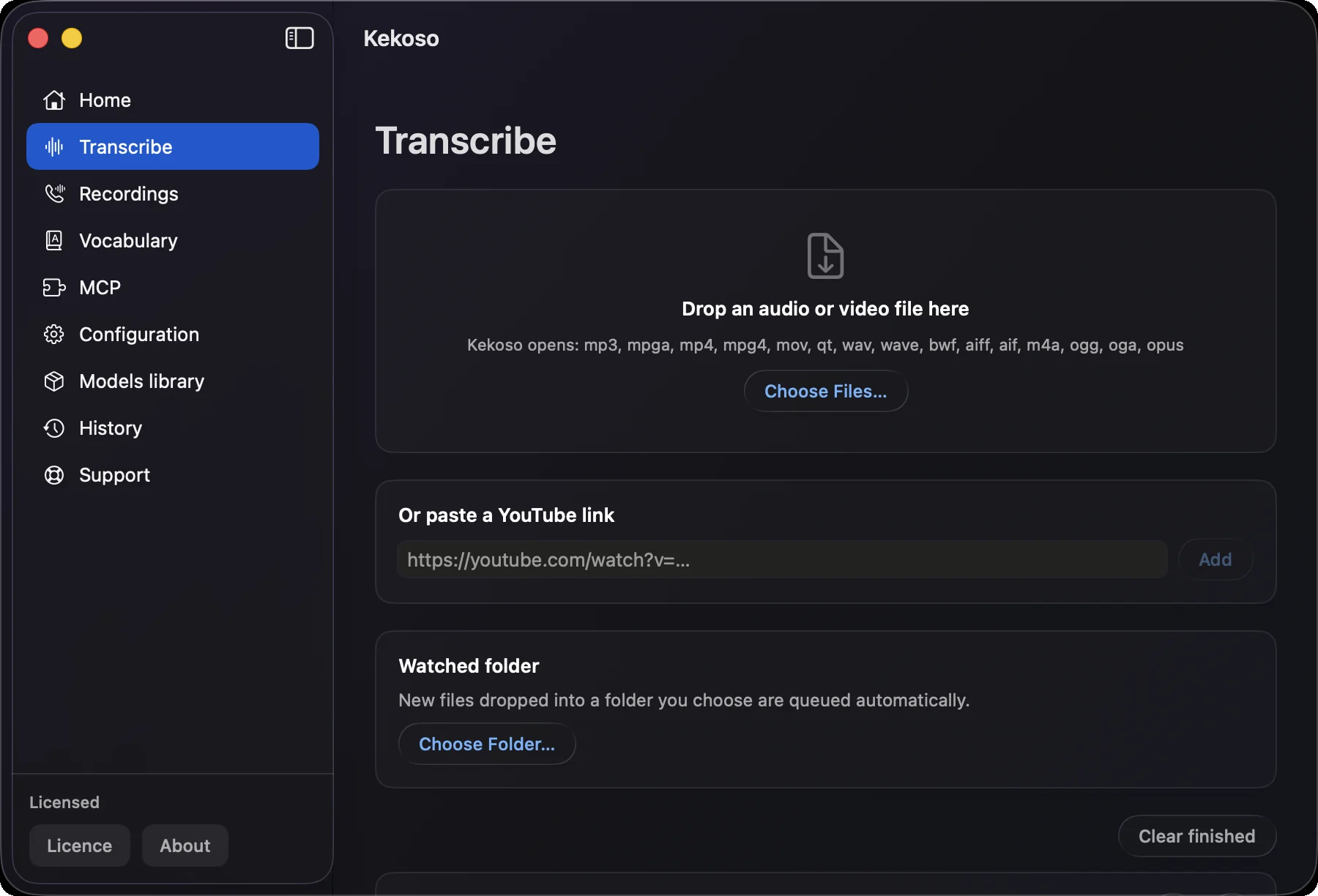
Kekoso converting an audio file to text on a Mac: an MP3 dropped into the Transcribe screen, transcript building beside it

How it works

Three steps, none of them an upload.

The file stays in the folder you left it in. What moves is the text, once there is some.

  1. 01

    Hand over the file

    Drag the MP3 onto the Transcribe screen, or right-click it in Finder and choose Open With → Kekoso. A folder full of them works the same way — point the app at the folder and each file is queued as it lands.

  2. 02

    It converts audio to text on the spot

    The speech model runs on your own machine. Nothing is uploaded, nothing is queued behind other people’s files, and the length of the recording is a question for your disk rather than for a plan tier.

  3. 03

    Take the text out

    Copy it, or export TXT for the words alone, SRT or VTT when you want the timecodes with them. The transcript is a plain file on your disk from the moment it exists.

What the converter does

Fifteen extensions in, plain text out.

Most ways to convert an audio file to text are a website with an upload box, a size cap and a free tier that ends on the second file. This one is an app on your Mac, and the cap is your disk. Sound to text transcription is the same job under a different word: whether you set out to convert sound to text or to convert an audio file to text, the route below is the one that does not involve an upload.

MP3, M4A, WAV, AIFF, OGG, Opus

The full list of extensions the app takes: mp3, mpga, m4a, wav, wave, bwf, aiff, aif, ogg, oga, opus — and mp4, mpg4, mov, qt when the audio you need is inside a video. That is what an MP3 to text converter has to cover, plus the containers people actually end up with.

No conversion before the conversion

Running Whisper by hand starts with an ffmpeg command that turns your file into 16-bit WAV. Here the file goes in as it is — an OGG from a Linux recorder, an AIFF out of Logic, a WAV from a field recorder, an M4A off a phone.

Timecodes, and subtitles if you want them

Every transcript carries timings, so you can jump back to the point in the audio a sentence came from. Export SRT or VTT and the same transcript becomes a subtitle file; TXT drops the timings when they are in the way.

A folder that empties itself

Point Kekoso at the folder your recorder saves into and every new file is converted as it appears. That is how you convert audio files to text in bulk without fifty drags and fifty uploads — fifty files in, fifty transcripts out.

Names spelled the way you spell them

A custom dictionary is applied after recognition, so surnames, drug names, part numbers and internal jargon come out right instead of being fixed by hand in every transcript.

Up to 99 languages

Parakeet for fast English and 24 other European languages, Whisper for the long tail, SenseVoice for Chinese, Cantonese, Japanese and Korean. Each model card shows measured accuracy and speed, so the trade-off stays yours.

The two you probably have

M4A off a phone, WAV off a recorder.

Between them these two cover most of what people actually hand over, and they fail in opposite ways everywhere else — one for how it is packaged, the other for how much it weighs.

M4A

M4A: what comes off a phone

Voice Memos, the iPhone recorder, WhatsApp voice messages, most Android recorders and anything exported from GarageBand produce M4A — a container with AAC inside it. It is the single most common file people arrive with, and Kekoso takes it whole: drag it in, or right-click and Open With. There is no step where you convert M4A to text by first converting M4A to something else — and unlike an M4A to text converter on the web, no step where you hand the file over at all.

One wrinkle worth knowing if the file came from a video site rather than a recorder: a DASH-packaged M4A reports its own length wrongly — exactly double — and any tool that trusts the container header shows a two-hour clip where an hour of audio sits. Kekoso reads the length from the audio itself for that reason, which is also why the progress you see matches the file you gave it.

WAV

WAV: what comes off a recorder

Field recorders, interview kits, studio sessions and anything captured for editing rather than for sending write WAV. Kekoso will transcribe WAV files as they are, and accepts all three of its extensions — wav, wave and the broadcast variant bwf, which is what most field recorders actually produce and what a surprising number of tools reject on the extension alone.

WAV is uncompressed, and that is the whole problem with converting WAV to text anywhere else. At 48 kHz, 24-bit, stereo, a minute is about 16.5 MB and an hour is close to a gigabyte — roughly twenty times what the same recording weighs as AAC. That is the number an online converter’s file size limit is built around. Here it does not come up: the file is read where it lies, so its size is a question for your disk rather than for an upload form.

If what you want is free and online

Then this is not it, and that is worth saying.

A lot of people looking for an audio to text converter want a web page with an upload box and no payment. Those exist, they work, and for one short file you do not mind sharing they are the sensible choice. Two things come with them: the file sits on someone else’s server under terms you probably did not read to the end, and the free tier is capped — by minutes, by file size, or by both.

There is also a genuinely free route that uploads nothing:brew install whisper-cpp, download a model, convert the file to 16-bit WAV with ffmpeg, and run it from the terminal. It costs nothing and does the job. Timed on 7 September 2026 the setup was under two minutes — 8.6 MB of program and a 141 MB model that downloaded in 39 seconds — so what you trade is the terminal and the WAV conversion step, not an evening. Thefour free routes are measured side by side, accuracy included.

Kekoso is the third option: the same on-device recognition, without the terminal, for $29 once. If the first two suit you better, they suit you better.

The four routes compared, costs and all

What it does not do

The limits, up front.

  • WMA, WebM and MKV do not open

    WMA and WebM announce themselves to macOS as playable audio and then refuse to decode; MKV has no registered file type at all, so nothing can even identify it. Kekoso tells you which of the two happened rather than failing quietly. One pass through ffmpeg or HandBrake makes any of them readable — and that pass is not something the app does for you.

  • Opus and OGA need macOS 15.4

    The app runs from macOS 14.4, but those two containers only became decodable in 15.4. On an older system they are refused with a reason rather than accepted and then failed halfway.

  • DRM-protected files are refused

    An audiobook from a store, a track with protected content, a lecture inside a course platform: the audio is not readable by anything but the seller’s own player. Kekoso checks for that before reading anything else, so you get an honest refusal instead of an empty transcript.

  • A file with no speech has nothing to convert

    A video exported without its audio track, or a recording where the microphone was never armed, contains nothing to recognise, and no software recovers what was not captured. The missing track is detected before the file is queued.

  • No speaker labels

    A two-person interview in one file comes back as one continuous transcript with timecodes, not split by who was talking. Kekoso does not do diarization. Calls recorded on the Mac itself are the exception, because the two sides are captured as separate tracks to begin with.

  • Apple silicon only

    macOS 14.4 or later · Apple silicon. Recognition leans on the Neural Engine, which Intel Macs do not have.

Questions

Before you drop the first file in.

How do I transcribe sound to text on a Mac?
Whether you call it audio to text or sound to text, the route is the same. Drag the file onto Kekoso, or right-click it in Finder and choose Open With → Kekoso. Recognition runs on your own machine and produces a transcript with timecodes, which you can copy or export as TXT, SRT or VTT. There is no upload step, no queue and no per-minute meter, because no server is involved at any point — audio to text transcription happens where the file already is.
Which formats does the converter take?
Fifteen extensions, so a sound file to text converter is what it amounts to in practice: mp3, mpga, m4a, wav, wave, bwf, aiff, aif, ogg, oga and opus for audio, plus mp4, mpg4, mov and qt when the speech is inside a video. Opus and OGA need macOS 15.4 or later. WMA, WebM and MKV do not open at all and need converting first.
How do I transcribe M4A to text on a Mac?
Yes, directly. M4A is what Voice Memos, the iPhone recorder, WhatsApp voice messages and most Android recorders produce, and the file goes in as it is — no converting M4A to WAV first. Recognition runs on your Mac, and the transcript comes out with timecodes.
Can it convert a WAV file to text?
Yes, including the broadcast variant. All three extensions are accepted — wav, wave and bwf — which covers field recorders and interview kits as well as ordinary exports. Size is not an issue the way it is with an online WAV to text converter: an hour of 24-bit stereo is close to a gigabyte, and here there is nothing to upload it to.
Is this a free audio to text converter?
No. It is a 7-day trial with no card and no account, and $29 once after that for up to 3 of your own Macs. Free online converters exist and are a reasonable choice for one short file you do not mind uploading; the trade you make there is that the file goes to someone else’s server under their terms, and that free tiers are usually capped by minutes, file size or both.
Is there a file size or length limit?
No. A three-hour recording converts the same way a voice note does, because nothing is uploaded and nothing is billed per minute. What limits you is disk space and patience, not a plan tier.
Is MP3 transcription any less accurate than a lossless file?
Barely. I measured it: compressing a recording twenty-two times moved the word error rate from 2.3% to 5.4%, and every version stayed readable. MP3 transcription is the common case here — most recorders produce MP3 or M4A — and the format is not what limits accuracy. Names and technical terms are, which is what the vocabulary is for.
Does the MP3 get uploaded anywhere?
No. The speech models run on your Mac and the transcription pipeline makes no network calls at all — the file is read in place and never copied. Turn off Wi-Fi and convert a file: it behaves exactly the same, which is the way to verify the claim rather than take it on trust.
Can I convert a batch of files at once?
Yes. Drop several files in together, or point the app at a folder and let it queue each new file as it appears. This is where a local converter pulls ahead of a website: there is no per-file upload and nothing to babysit.
Can I get timestamps or subtitles from the audio?
Yes. Every transcript carries timings, and SRT or VTT export turns it into a subtitle file. Precision differs by model: Whisper reports word-level times, Parakeet reports token times, and SenseVoice reports none, so timings estimated from SenseVoice are coarser.
What does it cost?
$29 once, for up to 3 of your own Macs, free updates through the 1.x line, and a 7-day trial. Converting audio to text is one part of the app: dictation, call recording, subtitles and a local MCP server come with it.

Pricing

Buy it once. It's a tool, not a tenancy.

Four jobs that usually arrive as four subscriptions, running on hardware you already paid for.

$29once

7-day free trial. No card to start.

  • Dictation, files and links, call recording and the MCP server — all of it
  • No per-minute billing, no monthly cap, no usage dashboard
  • Use it on up to 3 of your own Macs
  • Free updates through the whole 1.x line
  • Works offline indefinitely; no license check to phone home weekly
  • 30-day refund, no argument, no questionnaire

macOS 14.4 or later · Apple silicon · payment handled by Lemon Squeezy

Try it on your own words.

7 days, every feature unlocked, no card and no account. If it does not earn its place in your week, delete it and nothing follows you.

macOS 14.4 or later · Apple silicon