Skip to content
KekosoDownload

Video to text

Transcribe video to text on the machine it is already on.

Drop in an MP4 or a MOV — a lecture, a talk, an interview, a screen recording — and get the words out with timecodes. No audio to extract first, no upload, no per-minute meter. Subtitles export as SRT or VTT on the way out.

macOS 14.4 or later · Apple silicon · $29 once, not per month · 7-day trial

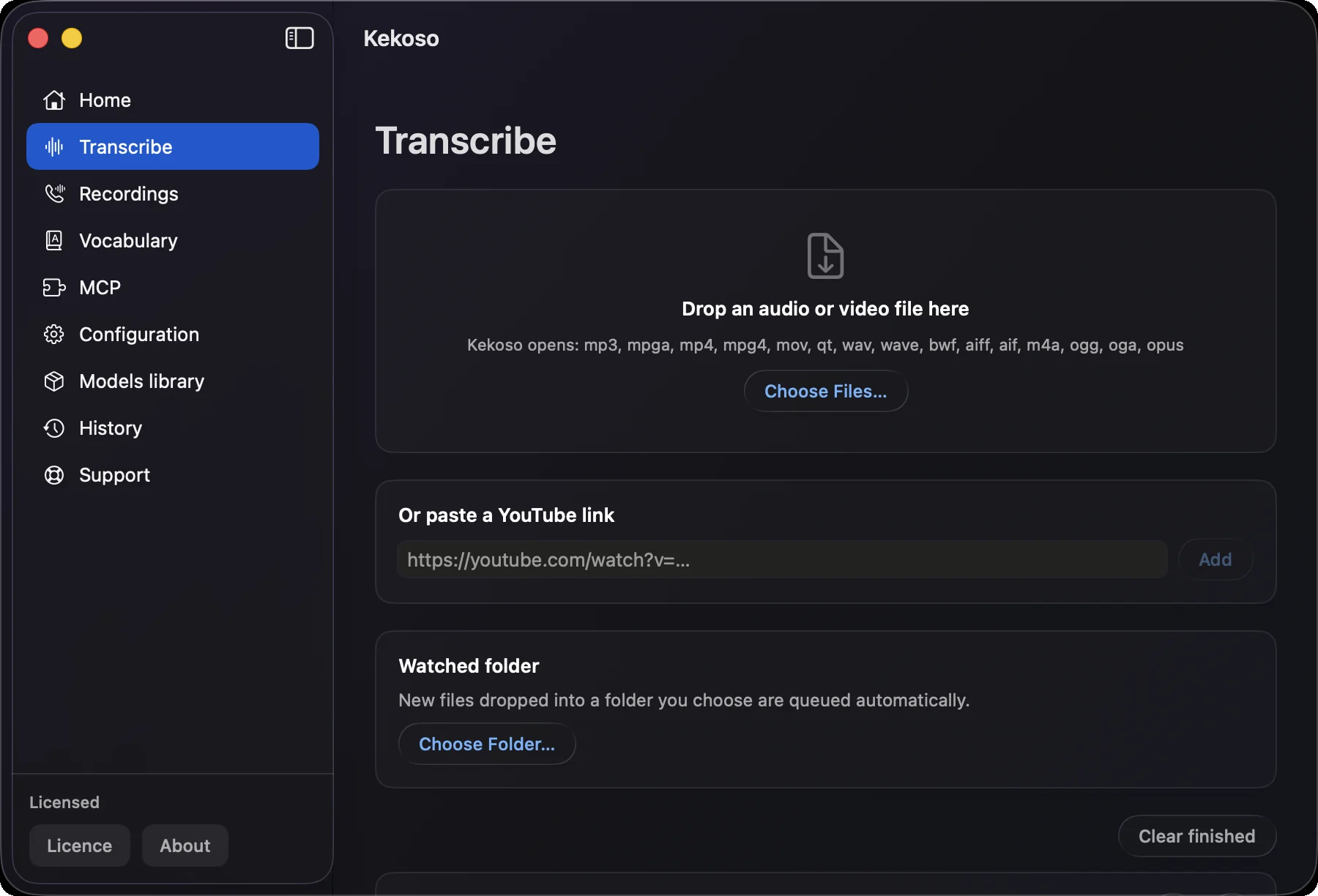
Kekoso transcribing a video to text on a Mac: an MP4 dropped into the Transcribe screen, next to a YouTube link field

How it works

From video to text in three steps.

The video stays where it is. What moves is the text, once there is some.

  1. 01

    Drop the video in

    Drag an MP4 or MOV onto the Transcribe screen, or right-click it in Finder and choose Open With → Kekoso. There is no step where you extract the audio first — the video file itself is what you hand over.

  2. 02

    It reads the audio track

    The speech model runs on your own machine, on the audio inside the container. A long recording keeps going while you do something else; nothing is queued on a server and nothing is metered.

  3. 03

    Take the transcript or the subtitles

    Copy the text, or export SRT and VTT with timecodes and load them straight into your editor, your player or YouTube. TXT is there when you want the words without the timings.

What the video transcriber does

Transcript, subtitles, or both.

Most ways to convert video to text are a website with a file size limit and a free tier that ends on the second upload. This video transcriber is an app on your Mac, and the limit is your disk.

MP4 and MOV, handed over whole

The two containers almost everything produces — phones, screen recorders, editors, cameras. Kekoso opens the file and works on the audio track inside it, so there is no ffmpeg step and no intermediate WAV to clean up afterwards.

Subtitles, not just a wall of text

Every transcript carries timecodes, and SRT or VTT export turns a recording into a subtitle file for the video it came from. Cues are grouped by broadcast readability rules rather than cut wherever the model paused — the details are on the subtitle generator page.

Length is a disk question

A three-hour conference recording transcribes the same way a ninety-second clip does. No plan tier, no per-minute billing, no upload limit — the video never goes anywhere, so there is nothing to meter.

A folder that empties itself

Point Kekoso at the folder your screen recorder or camera saves into, and each new video is queued as it lands. A day of footage becomes a day of transcripts without a single drag.

A YouTube link, when the file is not local

Paste a link to a video you own or have permission to use, and Kekoso fetches the audio and transcribes it the same way. That fetch is the one network request in the whole feature.

Up to 99 languages

Parakeet for fast English and 24 other European languages, Whisper for the long tail, SenseVoice for Chinese, Cantonese, Japanese and Korean. Each model card shows measured accuracy and speed, so the trade-off is yours to pick.

Where the video goes

It stays in the folder you left it in.

An online video transcriber starts by asking for the file. That means a copy of an unreleased cut, an internal all-hands, a client walkthrough or a recorded consultation sitting on a server you do not control, under terms you probably did not read to the end.

Kekoso reads the file in place. The transcription pipeline makes no network calls, nothing is copied, and the transcript is a plain local file. Turn off Wi-Fi and transcribe a video: it behaves exactly the same, because there was never a server in the loop.

How to verify that yourself

What it does not do

The limits, up front.

  • MKV, WebM and WMV do not open

    MKV has no registered file type on macOS at all, so nothing can identify it; WebM and WMV announce themselves as playable video and then refuse to decode. This video transcriber tells you which of the three happened instead of failing quietly. Converting the container first — one pass through HandBrake or ffmpeg — makes the file readable, and that conversion is not something Kekoso does for you.

  • DRM-protected video is refused

    A film bought from a store, a lecture inside a course platform, anything with protected content: the audio is not readable by any app that is not the store’s own player, and Kekoso says so rather than producing an empty transcript.

  • Silent video has nothing to transcribe

    A screen recording made without capturing audio has no speech in it, and no software recovers what was never recorded. Kekoso detects the missing track before queueing the file, so you find out in a second rather than after a long wait.

  • No speaker labels from a single track

    A conference talk or an interview filmed on one camera comes back as one continuous transcript with timecodes, not split by who was talking. Calls recorded on the Mac itself are the exception: your microphone and the other side are captured separately and labelled as such.

  • Apple silicon only

    macOS 14.4 or later · Apple silicon. Recognition leans on the Neural Engine, which Intel Macs do not have.

Questions

Before you drop the first video in.

How do I convert a video to text on a Mac?
Transcribing a video to text takes one drag. Whether you came looking for a video to transcript converter or for plain video to text transcription, the route is the same: drag the video onto Kekoso, or right-click it in Finder and choose Open With → Kekoso. Recognition runs on your own machine and produces a transcript with timecodes, which you can copy or export as TXT, SRT or VTT. Unlike an online video transcriber there is no upload and no separate step to extract the audio: the video file goes in as it is.
Can I transcribe video into text without converting the file first?
Yes. Kekoso reads the audio track straight out of the container, so there is no conversion step between the video and its transcript — MP4, MOV, M4V and MPG all go in as they are.
Do I have to extract the audio first?
No. Kekoso opens the container and reads the audio track inside it, so an MP4 or MOV is handed over whole. Extracting audio with ffmpeg is what you do when running Whisper from the terminal, and skipping that step is one of the reasons to use an app instead.
Which video formats work?
MP4 and MOV, which covers phones, screen recorders, cameras and most editors. MKV does not work at all, because macOS has no demuxer for it, and WebM and WMV pass the file type check but fail to decode. Converting the container first makes any of them readable.
Can it make subtitles for the video?
Yes. Export SRT or VTT and you have a subtitle file with timecodes for the video it came from, ready for an editor, a player or a YouTube upload. Timecode precision differs by model: Whisper reports word-level times, Parakeet reports token times, and SenseVoice reports none, so subtitles made from SenseVoice are coarser.
Is the video uploaded anywhere?
No. The speech models run on your Mac, and the transcription pipeline makes no network calls at all. The file is never copied and never sent. The single exception is a YouTube link, where the video has to be fetched from YouTube — nothing of yours goes the other way.
How long can the video be?
As long as your disk allows. Nothing is billed per minute and no plan caps the length, so a three-hour recording costs the same as a short clip: nothing beyond the licence.
Will it tell me who is speaking?
Not from a video recorded on one microphone — it comes back as one transcript with timecodes. Calls recorded on the Mac are different: Kekoso captures your microphone and the system audio as two tracks and labels them.
What does it cost?
$29 once, for up to 3 of your own Macs, free updates through the 1.x line, and a 7-day trial with no card and no account. Video transcription is one part of the app; dictation, call recording and the local MCP server come with it.

Pricing

Buy it once. It's a tool, not a tenancy.

Four jobs that usually arrive as four subscriptions, running on hardware you already paid for.

$29once

7-day free trial. No card to start.

  • Dictation, files and links, call recording and the MCP server — all of it
  • No per-minute billing, no monthly cap, no usage dashboard
  • Use it on up to 3 of your own Macs
  • Free updates through the whole 1.x line
  • Works offline indefinitely; no license check to phone home weekly
  • 30-day refund, no argument, no questionnaire

macOS 14.4 or later · Apple silicon · payment handled by Lemon Squeezy

Try it on your own words.

7 days, every feature unlocked, no card and no account. If it does not earn its place in your week, delete it and nothing follows you.

macOS 14.4 or later · Apple silicon